Command-line utilities
The command-line utilities listed below serve elementary steps in the flow of
Si oxidation by MD.
A more automated tool, handling the entire flow may be available at a later
stage.
Currently, such a tool is realized by a bash-script
(oxidise.sh), as shown in Examples and Tutorial.
Input files directing the conditions of MD simulations are outside the
scope of Poxy.
poxy_oxidise
poxy_oxidise [-h] [-m MODE] [-s STRUCT_TYPE] [-n NOXYGENS]
        [-e ELEMENTS] [-i INDEX_CFG] [-mincorerad MINCORERAD]
        [-minbondlen MINBONDLEN] [-overlap_radius OVERLAP_RADIUS]
        [-v] [-rv]
        infile outfile
Reads an atomic structure from infile, inserts one O atom (-n is
not currently supported) and writes to outfile.
The most important option is -s, which decides how to interpret the input atomic structure. Possibilities are wire, film (untested), and dot (untested). In each case, the routine assumes respectively a line, plane, and point of symmetry, from which distance of the oxidation front is established.
The mode of oxidation is also important. Limited support for layer-O-incorporation (-m layer), as opposed to single-O-atom incorporation (-m surface/suboxide/either) exists, but has not given ripe fruits yet.
Example
poxy_oxidise -m 'either' -s 'wire' -n 1 heated.SiNW.dump add.1.data
poxy_structure
poxy_structure [-h] [-natomtypes NATOMTYPES] [-e ELEMENTS]
        [-i INDEX_CFG] infile outfile
Reads and converts atomic structure from infile to the outfile format.
This is typically necessary to prepare input data for MD simulation from
a previous MD-dump file (having multiple structures at different time-steps),
a .gen file, or other input format.
Generally, the formats supported by ase.io.read/write() functions are
supported, plus more specific handling of LAMMPS dump and data files.
The -i options serves to extract specific atomic configuration from infile if it contains more than one. Default is -1, meaning last.
Note that in some cases the actual chemical elements may not be available in the infile. In this case the -e option must be used.
Example
Converting from a .gen file with Si atoms only to a LAMMPS-input data file with two atom types – Si (type1) and O (type2):
poxy_structure -e "Si O" pristine_SiNW.gen pristine.data
Extracting 3-rd snapshot from a LAMMPS-dump file and writing to .gen file (the -e option can be omitted if the dump contains the atomic symbols):
poxy_structure -i 2 -e "Si O" anneal.dump anneal.gen
poxy_view
poxy_view [-h] [-e ELEMENTS] [-i INDEX_CFG] [-r ROTATION]
        [-a SPHERE_RADII] [-c CUTOFFS] [-t TUBE_RADIUS]
        [-s CUTOFF_FACTOR] [-b]
        infile [outfile]
Renders the atomic structure from infile to png image via POV-Ray.
Unless output file is explicitly specified, the image will be infile.png
A few options has been exposed to the command-line options.
The underlying routine is dftbutils.structureutils.write_povpng.
Example
View the last atomic configuration from the MD dump after 90 degree rotation around the Y-axis. Show the bonds (default) and unit-cell boundary (with -b). When building the bond-list, use the specified cutoff radii (-c). Note the ticks around the -c option!
poxy_view -r '90y' '-c {"Si":1.385, "O":0.85}' anneal.dump

PNG image output from poxy_view with the help of POR-Ray.
poxy
The poxy command will combine/replace the above commands, which will become
sub-commands as suggested by the invocation below.
Currently, only the create command is implemented in this way, and it serves
to create pristine Si nano-structures (support for 110 and 100 oriented SiNW
is the only available to date). See poxy create -h for details.
$ poxy -h
usage: poxy [-h] [-v] {create,convert,image,oxidise} ...

Helper tool for performing oxidation of Si nano-structures by molecular
dynamics

optional arguments:
-h, --help            show this help message and exit
-v                    Verbose output

Available sub-commands::
{create,convert,image,oxidise}
create              Create a Si nano-structure
convert             Convert between different atomic structure file-
                        formats
image               Create a ray-traced PNG image of a structure
oxidise             Incorporate oxygen into an atomic structure
Example
The commands below create a Si NW oriented along [110], 20 A in diameter, 8 A in length, padded with 30 A vacuum buffer in the transverse directions. The structure will be saved to the filename following the -f option.
poxy create -s wire -o 110 -d 20 -l 8 -vac 30 -f nw_110_D20_L8.gen
poxy_view "-r 90y" '-c {"Si":1.385}' nw_110_D20_L8.gen
The result is shown in the figure below.
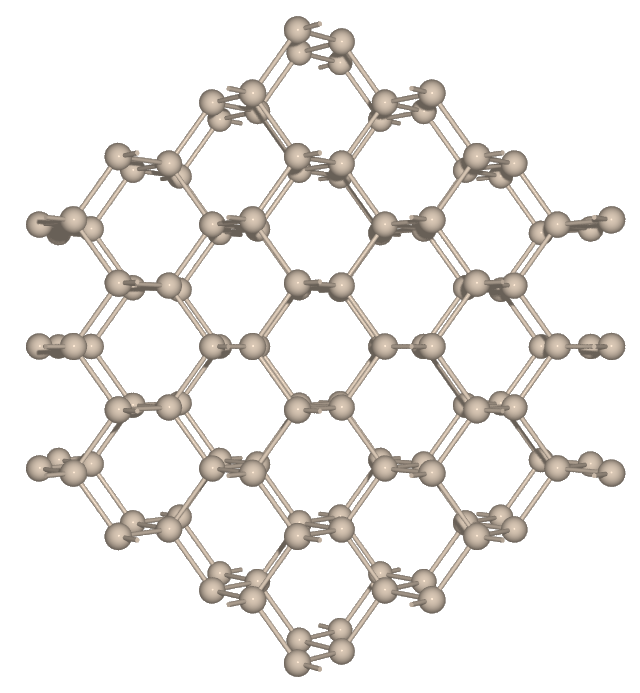
PNG image of nw_110_D20_L8.gen